How to Compare and Benchmark AI Models for Production
AI model comparison the right way: why public benchmarks and leaderboards mislead, how to build an eval set for your own use case, and how to pick the right model tier.
4 min read
Every AI project hits the same question early: which model do we use? The usual answer is to open a leaderboard and pick whatever sits on top. That is the wrong move. The model that wins a public benchmark often loses on your actual task, and it can cost far more to run. Here is the method I use to compare and benchmark AI models for production.
Public benchmarks are a starting point, not an answer
Public benchmarks and leaderboards measure general ability on fixed, public tests. Your product is narrow and specific: your data, your prompts, your formatting rules, your latency budget. A model can top the leaderboard and still get your task wrong. Worse, popular benchmarks get gamed, and their questions leak into training data, so the scores drift away from real quality over time.
A leaderboard number cannot see the things that actually decide the outcome for you:
Your domain and your data, not a generic test set
Your exact prompts and output format, like valid JSON with no extra text
The latency your users will actually tolerate
The cost at your real request volume
Tool use and instruction-following reliability
Refusals and safety behaviour on your kind of inputs
Build a small eval set from your real task
The highest-leverage move in model comparison is boring: build a small evaluation set from your real task. Twenty to fifty real examples, each with a known-good answer or a clear rubric. Run every candidate model through the same set and score the results. This one habit tells you more than every leaderboard combined, because it measures the only thing that matters, which is how the model does on your work.
Building it is straightforward:
Collect real inputs from your actual use case, including the messy ones
Write the ideal output, or a rubric a script can check
Add the hard and edge cases that break weak models
Keep it in version control so every model runs the exact same test
Automate the scoring wherever you can, so re-running is cheap
Score what actually matters for your product
Accuracy alone is a trap. Define the metrics that matter for your product and weight them: correctness, valid output format, latency at the 95th percentile, cost per thousand requests, and refusal rate. A model is only better if it wins on your weighted mix, not on someone else's test.
Match the model tier to the task
You do not need the biggest model for every job. Models fall into rough tiers, and each tier trades reasoning power against speed and cost. The trick is to match the tier to what the task actually needs.
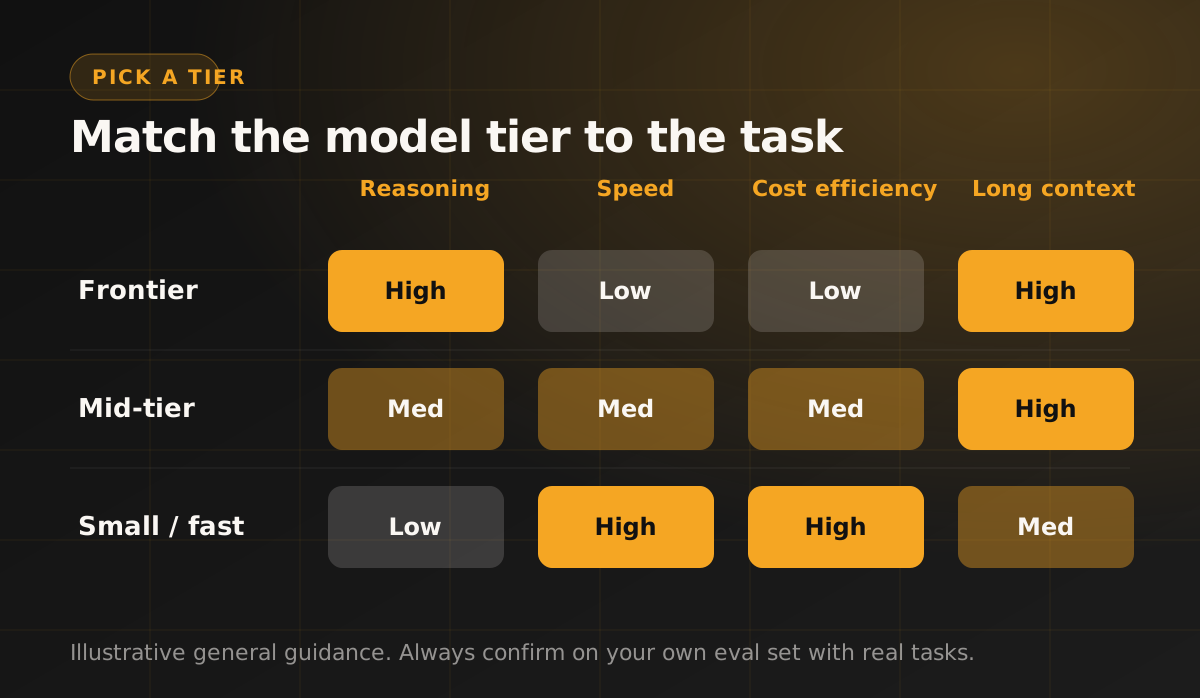
A frontier model is worth it for genuinely hard reasoning. For classification, extraction, routing, or simple replies, a small fast model is often just as good at a fraction of the cost. See my take on Claude vs GPT for production for how this plays out between specific models.
Cost and latency are part of the benchmark
At scale, cost and latency are not footnotes, they are part of the benchmark. A two percent quality gain that costs five times as much and doubles response time is usually a bad trade. Plot your candidates on quality against cost, and the right choice is usually obvious.
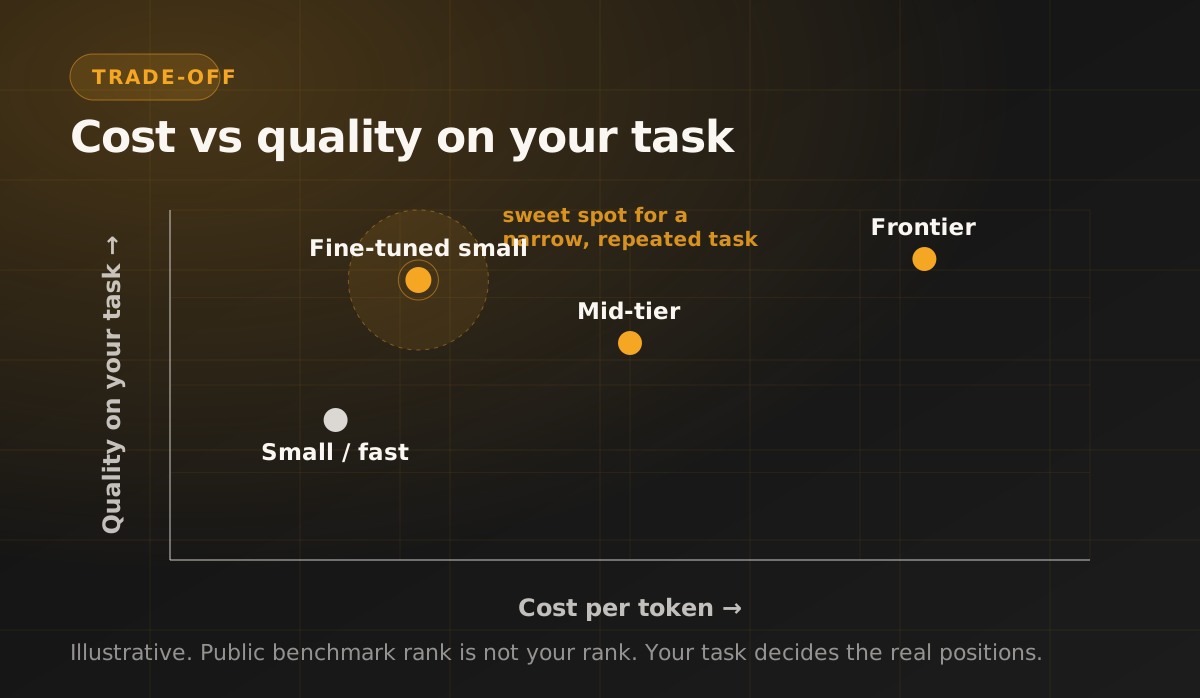
The sweet spot for a narrow, repeated task is often a small model that has been fine-tuned or carefully prompted for that one job. It can match a frontier model on your task at a fraction of the price. This is also where RAG rather than fine-tuning usually earns its place, when the gap is knowledge and not behaviour.
Route per task, do not crown one winner
Strong production systems rarely use a single model. They route: a cheap, fast model handles the easy majority, and a frontier model is called only for the hard cases. Keep the switch cheap by hiding the model behind a thin abstraction, so swapping or adding a model is a config change, not a rewrite. Models update every few months, and you want to re-benchmark and switch without touching your product.
How I do it in practice
Build the eval set before choosing anything
Measure quality, latency and cost together, never quality alone
Start with the cheapest model that passes the eval, then move up only if it fails
Re-run the eval whenever a model is updated
Keep routing swappable, so the choice is never permanent
If you are choosing a model, or your AI bill is climbing while quality stalls, this eval-first method is what fixes it. It is the same approach I use when I build production AI systems for clients. Put your real task at the centre, measure honestly, and let the numbers pick the model.
Building something with AI? Let's talk.
I design and ship production AI and full-stack products for US teams. See how I can help.
View all servicesJoin the newsletter
Be the first to read our articles.